
| 일 | 월 | 화 | 수 | 목 | 금 | 토 |
|---|---|---|---|---|---|---|
| 1 | 2 | 3 | 4 | 5 | 6 | |
| 7 | 8 | 9 | 10 | 11 | 12 | 13 |
| 14 | 15 | 16 | 17 | 18 | 19 | 20 |
| 21 | 22 | 23 | 24 | 25 | 26 | 27 |
| 28 | 29 | 30 | 31 |
- interface Set
- 개발은 어려워
- confluent
- MSA
- 교육은 더 어려움
- php 태그 닫지 않는 이유
- 만남은 쉽고
- intelliJ 인코딩
- echo system
- ksqldb
- 동기화 시스템
- Micro Service Architecture
- log4j 2.1.5
- interface List
- 원격 코드 실행 취약점
- java Stack
- intelliJ utf-8
- php 태그
- kafka
- javaList
- 개발서버
- java 버전업
- php 태그 닫기
- apache log4j2
- php ?>
- queue linkedList
- interface Map
- java Deque
- kotlin 자료구조
- java 자료구조
- Today
- Total
legato
Kotlin 친해지기 2 - VM에 DB(postgreSQL) 설치 및 springboot(kotlin) 연동 본문
Kotlin 친해지기 2 - VM에 DB(postgreSQL) 설치 및 springboot(kotlin) 연동
legato 2022. 4. 26. 10:24Kotlin 친해지기 1 - VM에 DB(postgreSQL) 설치 및 springboot(kotlin) 연동
Kotlin 친해지기 2 - VM에 DB(postgreSQL) 설치 및 springboot(kotlin) 연동
해당 VM-docker(container)-DB에 간단하게 springboot(kotlin)를 연동합니다.
docker-DB(postgreSQL)에 springboot 연동(kotlin)
1. spring initializer를 통해 프로젝트 생성 (또는 gradle 에 postgresql 관련 내용을 추가)
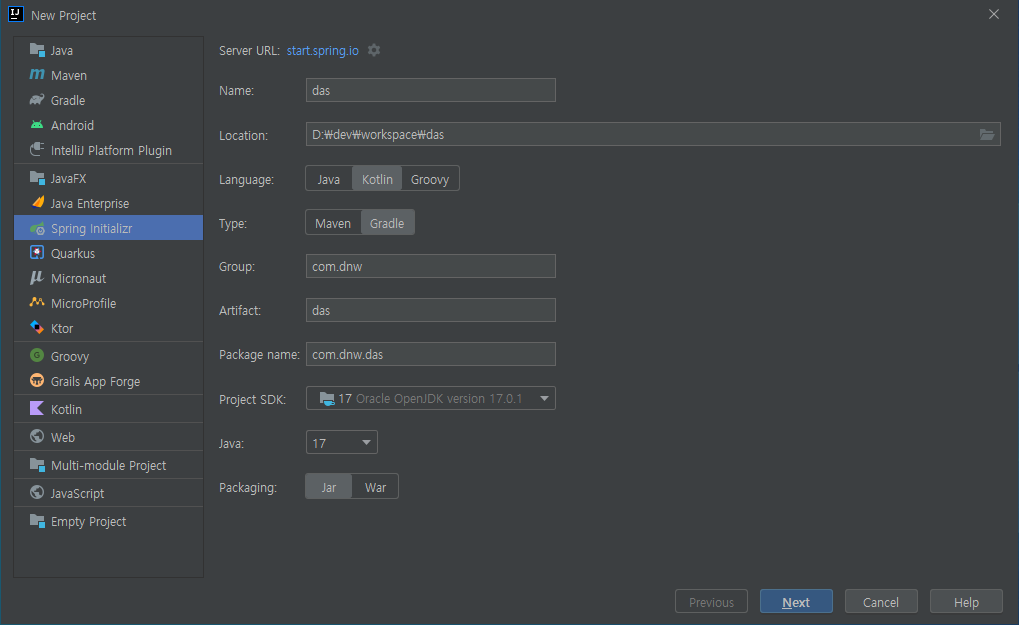
kotlin: 1.6.20 (https://blog.jetbrains.com/ko/kotlin/2022/04/kotlin-1-6-20-released/)
java:17
springboot: 2.6.7
2. dependencies 추가
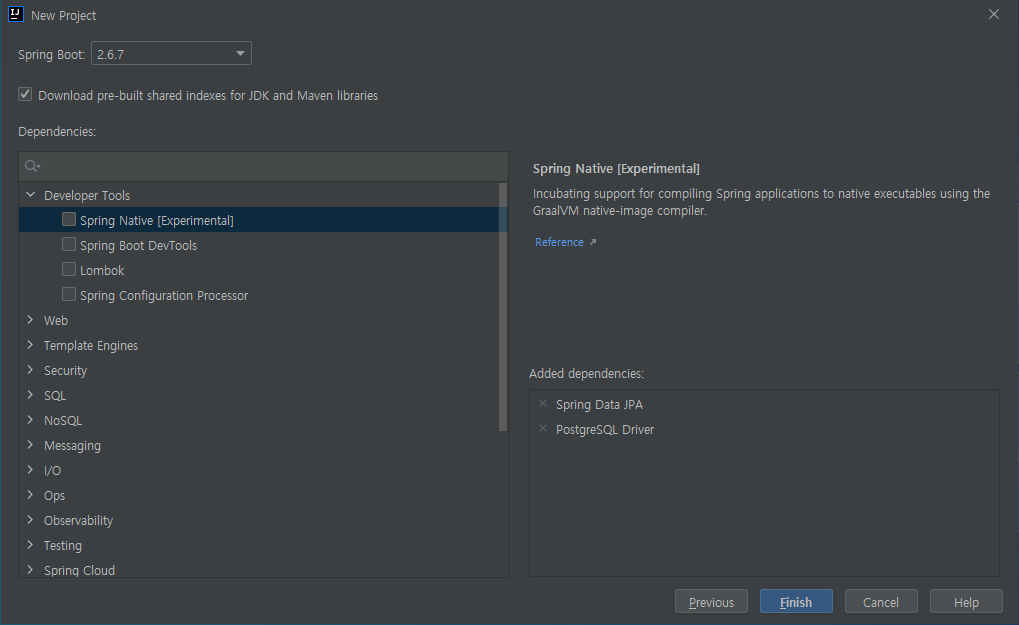
Spring Data JPA와 PostgreSQL Driver추가 (이 외 내용은 사용하면서 추가 예정)
import org.jetbrains.kotlin.gradle.tasks.KotlinCompile

plugins {
    id("org.springframework.boot") version "2.6.7"
    id("io.spring.dependency-management") version "1.0.11.RELEASE"
    kotlin("jvm") version "1.6.21"
    kotlin("plugin.spring") version "1.6.21"
    kotlin("plugin.jpa") version "1.6.21"
}

group = "com.dnw"
version = "0.0.1-SNAPSHOT"
java.sourceCompatibility = JavaVersion.VERSION_17

repositories {
    mavenCentral()
}

dependencies {
    implementation("org.springframework.boot:spring-boot-starter-web")
    implementation("org.springframework.boot:spring-boot-starter-data-jpa")
    implementation("org.jetbrains.kotlin:kotlin-reflect")
    implementation("org.jetbrains.kotlin:kotlin-stdlib-jdk8")
    runtimeOnly("org.postgresql:postgresql")
    testImplementation("org.springframework.boot:spring-boot-starter-test")
}

allOpen {
    annotation("javax.persistence.Entity")
    annotation("javax.persistence.MappedSuperclass")
    annotation("javax.persistence.Embeddable")
}

tasks.withType<KotlinCompile> {
    kotlinOptions {
        freeCompilerArgs = listOf("-Xjsr305=strict")
        jvmTarget = "17"
    }
}

tasks.withType<Test> {
    useJUnitPlatform()
}
3. gradle 내용 확인
gradle 확인하면 기존 springboot(java) 프로젝트와 다른점이 있는데
plugin.spring 이라는게 있다.
https://docs.spring.io/spring-boot/docs/current/gradle-plugin/reference/htmlsingle/
해당 플러그인은 intelliJ에서 만들었으며,
공식문서에 아래 어노테이션에 붙어있는 Class에 대해서는 자동적으로 open class로 만들어주게 되는 것이다.(all open)
(kotlin-allopen과 plugin.spring은 동일한 프로젝트이다.)
@Component, @Async, @Transactional, @Cacheable, @SpringBootTest
@Configuration, @Controller, @RestController, @Service, @Repository, @Component
4. all open 설정하는 이유
open class란?
코틀린에서는 기본적으로 클래스에는 final 키워드가 추가된다.(final 키워드를 생략하더라도 클래스 빌드하면 final 키워드가 붙는다.)
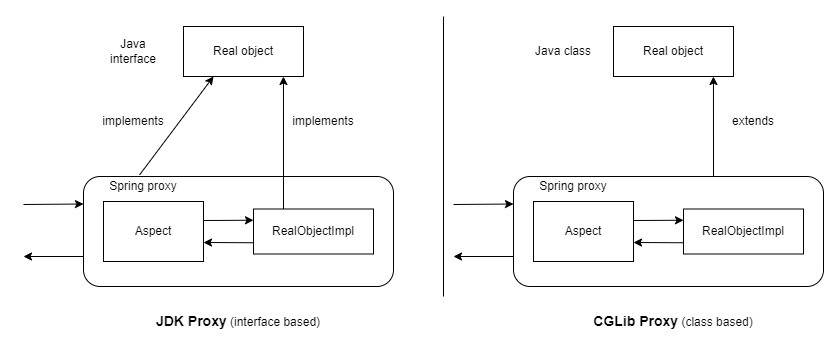
spring boot2 부터 CGLIB proxy 방식으로 bean을 관리하는데, 이는 Target class 를 상속받아 생성하기 때문에 상속이 가능한(open) 상태여야 한다.
5. plugin.jpa 플러그인은 뭘까? 왜 필요할까?
plugin.jpa 플러그인을 사용하면 @Entity, @Embeddable, @MappedSuperClass 어노테이션을 사용할 때 no-arg 생성자(기본 생성자)가 자동으로 생성된다.
JPA 사용시 initialize 등을 통하지 않고 dependencies에 아래 명령어만 추가해서 사용시 오류가 발생한다.
implementation("org.springframework.boot:spring-boot-starter-data-jpa")
오류 메세지
Failed to resolve parameter [...] in constructor ...
(기본 생성자가 없어서 Error가 발생하고 있다.)
Hibernate는 Reflection으로 객체를 생성하기 때문에 protected 이상의 생성자가 필요하다.
이쯤에서 한가지 의문이 드은데,
Kotlin은 기본적으로 final이기 때문에 Proxy 클래스를 생성하지 못한다.
Proxy 클래스를 생성하기 위해서는 상속이 가능해야 하므로 open이 필요한데 없으니,
Proxy 기반으로 Lazy Loading을 진행할 수 없다.
allOpen {
annotation("javax.persistence.Entity")
annotation("javax.persistence.MappedSuperclass")
annotation("javax.persistence.Embeddable")
}
위와같이 gradle에 내용을 추가하면 Proxy 기반으로 Lazy fetch를 할 수 있다.
6. application.properties에 postgresql 관련 정보 추가
# postgreSQL
spring.datasource.driver-class-name=org.postgresql.Driver
spring.datasource.url=jdbc:postgresql://192.168.56.101:5432/pricecompare
spring.datasource.username=w
spring.datasource.password=qwer1234

# PUT, DELETE 메서드를 사용하기 위해 추가
spring.mvc.hiddenmethod.filter.enabled=true

# JPA
#spring.jpa.properties.hibernate.dialect=org.hibernate.dialect.PostgreSQL10Dialect
spring.jpa.hibernate.ddl-auto=update
spring.jpa.properties.hibernate.format_sql=true
spring.jpa.show-sql=true
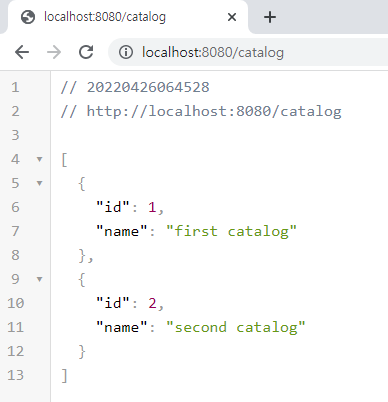
7. 간단한 샘플 프로그램 개발
Catalog.kt
package com.dnw.das.domain

import com.dnw.das.dto.CatalogDto
import javax.persistence.Entity
import javax.persistence.GeneratedValue
import javax.persistence.GenerationType
import javax.persistence.Id

@Entity
class Catalog (
    @Id
    @GeneratedValue(strategy = GenerationType.IDENTITY)
    var id: Long? = null,
    var name: String? = null
){
    fun toCatalogDto(): CatalogDto {
        return CatalogDto(
            id = id,
            name = name
        )
    }
}
CatalogController.kt
package com.dnw.das.controller

import com.dnw.das.domain.Catalog
import com.dnw.das.dto.CatalogDto
import com.dnw.das.service.CatalogService
import org.springframework.beans.factory.annotation.Autowired
import org.springframework.http.ResponseEntity
import org.springframework.web.bind.annotation.*

@RestController
@RequestMapping("catalog")
class CatalogController (@Autowired var catalogService: CatalogService) {

    @GetMapping("{id}")
    fun catalog(@PathVariable id: Long): ResponseEntity<CatalogDto> {
        val catalog = catalogService.findById(id)
        return ResponseEntity.ok().body(CatalogDto.from(catalog.get()))
    }

    @GetMapping
    fun catalogs(): List<CatalogDto> {
        val catalogs = catalogService.findAll()
        return catalogs.map { it.toCatalogDto() }.toList()
    }

    @PostMapping
    fun create(catalogDto: CatalogDto): ResponseEntity<CatalogDto> {
        val catalog = catalogService.save(Catalog(catalogDto.id, catalogDto.name))
        return ResponseEntity.ok().body(CatalogDto.from(catalog));
    }
}
CatalogDto.kt
package com.dnw.das.dto

import com.dnw.das.domain.Catalog

data class CatalogDto (
    val id: Long? = null,
    val name: String?
) {
    fun toEntity(): Catalog {
        return Catalog(
            id = id,
            name = name
        )
    }
    companion object {
        fun from(catalog: Catalog): CatalogDto {
            return catalog.run {
                CatalogDto(id = id, name = name)
            }
        }
    }
}
CatalogRepository.kt
package com.dnw.das.repositories

import com.dnw.das.domain.Catalog
import org.springframework.data.jpa.repository.JpaRepository

interface CatalogRepository: JpaRepository<Catalog, Long> {
}
CatalogService.kt
package com.dnw.das.service

import com.dnw.das.domain.Catalog
import com.dnw.das.repositories.CatalogRepository
import org.springframework.stereotype.Service
import org.springframework.transaction.annotation.Transactional
import java.util.*

@Service
class CatalogService (private val catalogRepository: CatalogRepository) {

    fun findById(id: Long):Optional<Catalog> {
        return catalogRepository.findById(id)
    }

    fun findAll():List<Catalog> {
        return catalogRepository.findAll()
    }

    @Transactional
    fun save(catalog: Catalog):Catalog {
        return catalogRepository.save(catalog)
    }
}
'programming > Kotlin' 카테고리의 다른 글
| Kotlin 친해지기 1 - VM에 DB(postgreSQL) 설치 및 springboot(kotlin) 연동 (0) | 2022.04.26 |
|---|
